How to Audit Your Subscriptions and Cancel What You Don't Use
Subscriptions are the quietest drain on household budgets. Learn how to find every subscription, audit what you actually use, cancel the rest, and prevent subscription creep from happening again.
The subscription creep
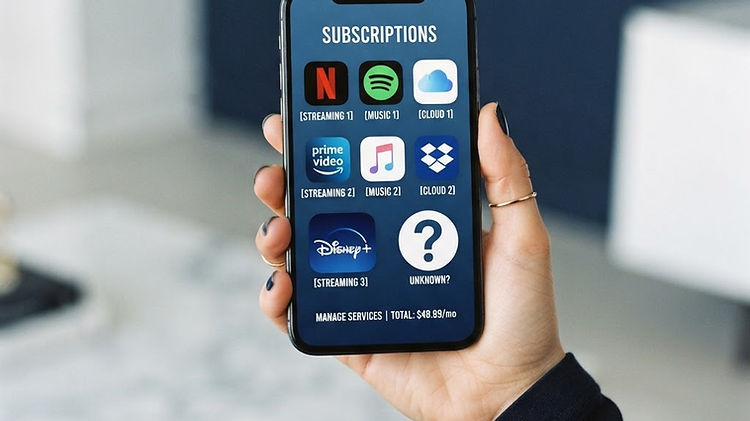
Subscriptions are the quietest drain on household budgets. A streaming service here, a cloud storage plan there, a fitness app, a news subscription — each one seems small, usually $10–$25/month. But they add up, and because they're automatic, they keep charging long after you've stopped using them.
The average Australian household has 15–20 subscriptions and spends $1,500–$3,000/year on them. Studies consistently find that people underestimate their subscription spending by 30–50% — not because they're dishonest, but because the charges are small, frequent, and easy to forget.
This guide walks through how to audit your subscriptions, cancel what you don't use, and keep only what's worth it.
Step 1: Find every subscription
The first challenge is finding them all. Subscriptions hide in three places:
Bank and credit card statements
Go through your last 3 months of statements and look for recurring charges. Search for keywords like "subscription," "monthly," "annual," and the names of common services. Flag every recurring charge, no matter how small.
App stores
Many subscriptions are billed through Apple or Google, not directly. Check:
- Apple: Settings → [your name] → Subscriptions
- Google Play: Google Play Store → Menu → Subscriptions
These show all subscriptions billed through the app store, including free trials that have converted to paid.
Direct debits
Check your bank's direct debit list or your online banking for scheduled payments. Some subscriptions come out as direct debits rather than card charges.
Step 2: List and categorise
Once you've found them all, list each subscription with:
- Name
- Cost (monthly or annual)
- Frequency
- Annual cost (monthly × 12, or the annual amount)
- Last used (be honest — when did you last use this?)
Example audit
| Subscription | Monthly | Annual | Last used | |---|---|---|---| | Netflix | $22.99 | $276 | Last week | | Spotify | $11.99 | $144 | Today | | Gym | $25.00 | $300 | 3 months ago | | Adobe Creative Cloud | $29.99 | $360 | 6 months ago | | News subscription | $15.00 | $180 | Last month | | iCloud storage | $1.49 | $18 | Daily | | Fitness app | $19.99 | $240 | 2 months ago | | Total | $126.45 | $1,518 | |
Step 3: Evaluate each one
For each subscription, ask three questions:
1. Have I used this in the last 30 days?
If no, it's a candidate for cancellation. If you haven't used it in a month, you're unlikely to use it next month. The exception is seasonal subscriptions (a sports streaming service during the season, a tax software during tax time).
2. Does it provide value equal to its cost?
A $22.99/month streaming service that you watch 10 hours a week provides good value. A $25/month gym you haven't visited in 3 months does not. Be honest — the question isn't whether you intend to use it, but whether you actually do.
3. Is there a cheaper alternative?
- Can you share a family plan? Many services offer family plans that cover 5–6 people for a small premium. Splitting with family or friends can halve the cost.
- Is there a free tier? Spotify, YouTube, and many news sites have free versions. If the free version meets your needs, the paid version isn't worth it.
- Can you rotate? Instead of having Netflix, Stan, and Binge all year, subscribe to one at a time and rotate. You watch the same shows but pay for one service at a time.
Step 4: Cancel what you don't use
From the example above, the gym ($300/year, unused in 3 months), Adobe ($360/year, unused in 6 months), and the fitness app ($240/year, unused in 2 months) are clear candidates:
- Gym: $300/year saved
- Adobe: $360/year saved
- Fitness app: $240/year saved
- Total saved: $900/year
That's $75/month back in your pocket — money that can go toward a savings goal or simply reduce financial pressure.
How to cancel
- App store subscriptions: cancel in the app store settings (Apple or Google). The subscription continues until the end of the current period.
- Direct subscriptions: cancel on the service's website. Some make it easy; others require a phone call or chat. Persist — it's your money.
- Gym memberships: these can be the hardest to cancel. Check your contract for the cancellation process and notice period. If they make it difficult, contact your state's consumer protection agency.
Step 5: Prevent subscription creep
Once you've cleaned up, prevent it from happening again:
- Set a renewal reminder. For subscriptions you keep, set a calendar reminder a week before renewal. If you haven't used it in the last month, cancel before you're charged again.
- Use a single payment method. Put all subscriptions on one credit card or through one app store. This makes them easy to find and audit.
- Review quarterly. Every 3 months, spend 15 minutes reviewing your subscriptions. New ones creep in, and usage changes.
- Avoid free trials. Free trials that require a credit card convert to paid subscriptions if you forget to cancel. If you do take a trial, set a reminder to cancel before the trial ends.
The free trial trap
Free trials are designed to convert. The business model depends on people forgetting to cancel. Three rules:
- Only take a trial if you intend to subscribe. If you're just trying it out, you'll probably forget to cancel.
- Cancel immediately after signing up. You still get the trial period, but it won't auto-convert. You can always re-subscribe if you decide to keep it.
- Set a reminder. If you don't cancel immediately, set a reminder 2 days before the trial ends.
Tracking subscriptions in Payday Compass
The Payday Compass app lets you enter each subscription as a bill with its monthly frequency and due date. They'll appear in your runway alongside your other bills, so you can see the total subscription cost and whether it's affecting your buffer.
For a quick check on how much your subscriptions are costing you relative to your income, use the free payday calculator — enter your subscriptions as monthly bills and see your available money with and without them.
Summary
Subscription creep is the result of small, automatic charges that you forget about. The fix is a regular audit: find every subscription, list them with their cost and last-used date, cancel what you haven't used in 30 days, and prevent creep by using a single payment method and reviewing quarterly. A 30-minute audit can save $500–$1,000/year — money that's better in your account than in a service you don't use.
To track subscriptions alongside all your household bills, try the Payday Compass Money Runway.
Put it into practice
The Payday Compass workbook brings these ideas together in one organised spreadsheet.
Explore the Budget Planner